您现在的位置是:网站首页> 编程资料编程资料
asp.net微信开发(用户分组管理)_实用技巧_
 2023-05-24
396人已围观
2023-05-24
396人已围观
简介 asp.net微信开发(用户分组管理)_实用技巧_
上一篇已讲解到新建用户分组,移动用户到分组的功能,这一章主要讲解修改分组名称和删除分组
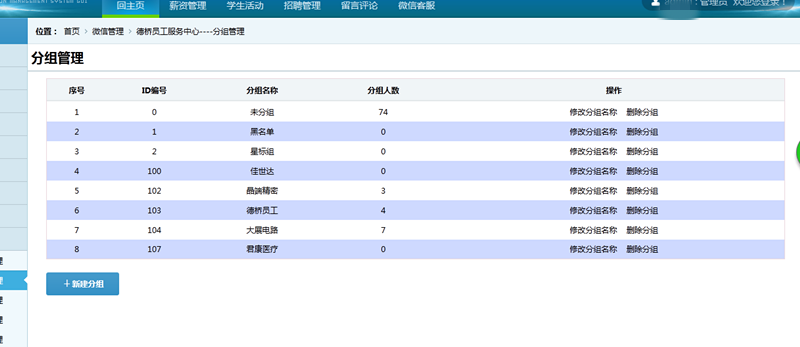
直接上代码,废话不多说,获取分组列表需要用到的实体类
////// 微信分组类 /// public class WxGroupsInfo { public string Group_ID { get; set; }//分组编号 public string Group_Name { get; set; }//分组名称 public string Group_Count { get; set; }//分组人数 }
前台代码:
后台代码如下:
protected void Page_Load(object sender, EventArgs e) { if(!Page.IsPostBack) { BindGroupList(); this.DataBind(); } } private void BindGroupList() { WeiXinServer wxs = new WeiXinServer(); ///从缓存读取accesstoken string Access_token = Cache["Access_token"] as string; if (Access_token == null) { //如果为空,重新获取 Access_token = wxs.GetAccessToken(); //设置缓存的数据7000秒后过期 Cache.Insert("Access_token", Access_token, null, DateTime.Now.AddSeconds(7000), System.Web.Caching.Cache.NoSlidingExpiration); } string Access_tokento = Access_token.Substring(17, Access_token.Length - 37); string jsonres = ""; string content = Cache["AllGroups_content"] as string; if (content == null) { jsonres = "https://api.weixin.qq.com/cgi-bin/groups/get?access_token=" + Access_tokento; HttpWebRequest myRequest = (HttpWebRequest)WebRequest.Create(jsonres); myRequest.Method = "GET"; HttpWebResponse myResponse = (HttpWebResponse)myRequest.GetResponse(); StreamReader reader = new StreamReader(myResponse.GetResponseStream(), Encoding.UTF8); content = reader.ReadToEnd(); reader.Close(); //设置缓存的数据7000秒后过期 Cache.Insert("AllGroups_content", content, null, DateTime.Now.AddSeconds(7000), System.Web.Caching.Cache.NoSlidingExpiration); } //使用前需要引用Newtonsoft.json.dll文件 JObject jsonObj = JObject.Parse(content); int groupsnum = jsonObj["groups"].Count(); List wxgrouplist = new List(); for (int i = 0; i < groupsnum; i++) { WxGroupsInfo wginfo = new WxGroupsInfo(); wginfo.Group_ID = jsonObj["groups"][i]["id"].ToString(); wginfo.Group_Name = jsonObj["groups"][i]["name"].ToString(); wginfo.Group_Count = jsonObj["groups"][i]["count"].ToString(); wxgrouplist.Add(wginfo); } this.RepeaterGroupList.DataSource = wxgrouplist; this.RepeaterGroupList.DataBind(); } /// /// 绑定事件 /// /// /// protected void RepeaterGroupList_ItemDataBound(object sender, RepeaterItemEventArgs e) { if(e.Item.ItemType==ListItemType.Item||e.Item.ItemType==ListItemType.AlternatingItem) { Label lbXuHao = e.Item.FindControl("lbXuHao") as Label; int num = 1; lbXuHao.Text = num.ToString(); for (int i = 0; i < this.RepeaterGroupList.Items.Count;i++ ) { num += 1; lbXuHao.Text = num.ToString(); } LinkButton LinkBtnDeleteGroup = e.Item.FindControl("LinkBtnDeleteGroup") as LinkButton; LinkBtnDeleteGroup.Attributes.Add("OnClick", "return confirm('您确定要删除该分组?删除后该分组内的人员即将恢复到默认分组!')"); } } /// /// 执行事件 /// /// /// protected void RepeaterGroupList_ItemCommand(object source, RepeaterCommandEventArgs e) { //ScriptManager.RegisterClientScriptBlock(this.Page, this.GetType(), "", "alert('删除接口已关闭!');location='WxGroupManageList.aspx';", true); if (e.CommandName == "DeleteGroups") { WeiXinServer wxs = new WeiXinServer(); string res = ""; ///从缓存读取accesstoken string Access_token = Cache["Access_token"] as string; if (Access_token == null) { //如果为空,重新获取 Access_token = wxs.GetAccessToken(); //设置缓存的数据7000秒后过期 Cache.Insert("Access_token", Access_token, null, DateTime.Now.AddSeconds(7000), System.Web.Caching.Cache.NoSlidingExpiration); } string Access_tokento = Access_token.Substring(17, Access_token.Length - 37); string posturl = "https://api.weixin.qq.com/cgi-bin/groups/delete?access_token=" + Access_tokento; //POST数据例子: POST数据例子:{"group":{"id":108}} string groupid = e.CommandArgument.ToString(); string postData = "{\"group\":{\"id\":\"" + groupid.ToString() + "\"}}"; res = wxs.GetPage(posturl, postData); ScriptManager.RegisterClientScriptBlock(this.Page, this.GetType(), "", "alert('删除成功!由于缓存问题,您可能需要重新登录才能看到效果!');location='WxGroupManageList.aspx';", true); } } /// /// 创建分组 /// /// /// protected void LinkBtnCreateGroup_Click(object sender, EventArgs e) { if (this.txtgroupsName.Value.ToString().Equals("分组名称")) { //// ScriptManager.RegisterClientScriptBlock(this.Page, this.GetType(), "", "alert('不能为空!')", true); this.txtgroupsName.Focus(); return; } WeiXinServer wxs = new WeiXinServer(); string res = ""; ///从缓存读取accesstoken string Access_token = Cache["Access_token"] as string; if (Access_token == null) { //如果为空,重新获取 Access_token = wxs.GetAccessToken(); //设置缓存的数据7000秒后过期 Cache.Insert("Acce
点击排行
本栏推荐


